Image Map
Showing posts with label Apps. Show all posts

Tuesday, October 28, 2014

{Review + Giveaway} Sequencing App

Disclaimer: I was provided a copy of this app; however, the opinions expressed are solely my own.

Recently I was contacted by I Can Do Apps to do an app review! I am excited to be sharing my thoughts on their Sequencing app.

It is available in the app store for $4.99 (click above picture). Sequencing is an important skill for both functional daily living, as well as story telling. There are 5 different activities within the app. 

This is the main screen:


This is an example of the first activity (ID the picture that occurs first or last). This one was my favorite activity because a lot of my kids struggle with first and last. 


This is an example of the second activity (ID what picture happens next):


This is an example of the third activity (touch the pictures in the order that they occur). I have to say, this one was the hardest for my students. I don't know if they all understood the concept of touching one picture then the next picture. 


This is an example of the fourth activity (put three pictures in the order they happen):


This is an example of the fifth activity (number the stages).


Under settings, you can turn the words and reinforcement on or off, plus see other available apps made by this company.


What I Liked:
-several levels available so it can work for different students/ability levels
-clean, uncluttered graphics
-this app really targets temporal concepts, which so many of my students struggle with
-the fifth activity really allows you to see if your students understand the concept of sequencing (but they do need to be able to read)

What I Would Love To See:
-I'd love the ability to put in your own pictures
-I'd also love to see 4 and 5 step picture sequences

Overall, this is an excellent app with varying levels to help students learn sequencing. The different activities kept my students' attention and it was a fun way to work on this type of skill. 

Enter to win a copy below:

Thursday, August 14, 2014

Articulation Test Center {App Review}

Today, I'm reviewing Articulation Test Center from Little Bee Speech. It is $49.99 in the app store. You can watch a tutorial video for the screener and the full test. 

Disclaimer: A copy of this app was provided; however, the opinions are solely my own. 

This app tests articulation and phonology skills, gives reports/recommendations, and can be used to test clients of 2 years and up. 

When you open this app, you see this screen:

 If you choose "Screener," you'll be taken to this screen where you can choose the client's age:

One of the things I love is that when you click on an age, it brings up a window with all the sounds that are tested at each age:

If you choose "Full Test," you will be see this screen:

You can choose to test initial, medial, final sounds, initial blends, vowels, R, or do a speech sample.

This is an example of what the stimulus screen looks like. The target sounds are in green. If the child says it correctly, you do nothing to the "tiles." If the sound is approximated, you tap twice, which will turn it yellow. If the sound is omitted, you swipe up which will show a "no" sign. On each stimulus page, you have the option to pull up a notes page, where you can type in additional notes. 

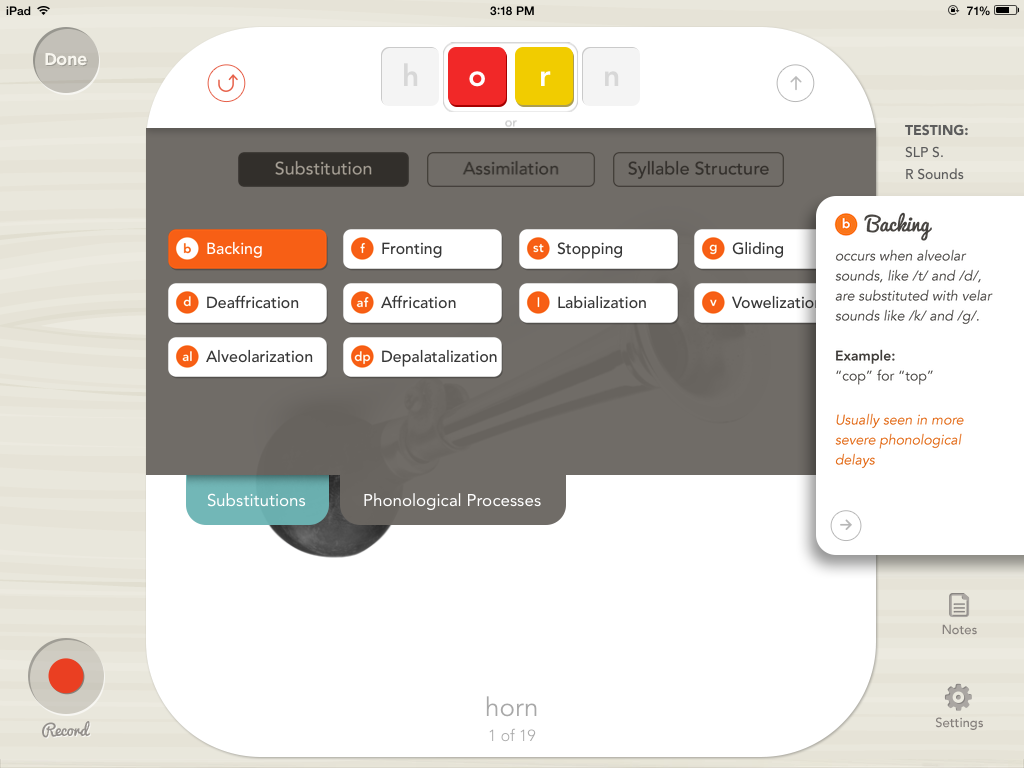
If you click the arrow pointing up on the right hand side, you can mark substitutions (consonants and vowels):

You can also mark phonological processes too. It gives you examples of each process if you are unsure. 

You can also choose a scene to obtain a speech sample that can be recorded. I absolutely LOVE this feature! It would be great to monitor progress, as you could go back and record another to compare later on. 

You're also asked to rate the intelligibility as poor, fair, or good. 

In the results section, you will see multiple pages. The "words tested" page looks like the screen below. I made up a client in order to show the results page. 

The "errors marked" page looks like the page below. A red circle indicates that the sound was produced incorrectly, while a yellow circle indicates that the sound was approximately produced. It also indicates what age the client should have mastered the sound. You can also choose to view the substitutions or phonological processes.

 If there is a speech sample, it will be in the "speech sample" section. There is also a "report" page that automatically generates a report!!! How awesome is that?!?! You are able to type in your own conclusions as well.

The "recommendation" page states what sounds are recommended to work on. Of course, you'll be using your clinical judgment as well when deciding on treatment targets. 

This app is great for on-the-go SLPs who need to travel between sites or home visits. You probably already carry your iPad, so it's all there. I really like that there's a screener and a full test version. It's easy to mark approximations and omissions, which makes scoring easier than traditional pen/paper tests. The results are saved so that you can go back and look at data to monitor progress. I also really like that you can put the speech sample right in there with built in scenes to discuss. 

Several SLPs now have access to iPads to use in therapy, so this is another great way to use it. It lessens the amount of "stuff" you have to carry around, yet still provides a comprehensive assessment of articulation and phonological processes. This is just another example of how technology is saving us time and energy! Great job, Little Bee Speech!

Wednesday, April 23, 2014

U.T.F. Unexpected Therapy Find Linky Party


Melanie at The Speech Place has started a linky party for U.T.F. or Unexpected Therapy Find. This month features apps. I love finding apps that aren't designed specifically for speech therapy, but seem to work wonderfully during sessions. 

Here are the ones I find myself frequently using:


Oscar Pizza Chef: This is a cute app featuring 10 recipes for different pizzas. You have to follow the recipe exactly, otherwise the monster at the end gets mad and throws it. Great for following directions and it's quick!


Show Me: This is a simple whiteboard app. Sometimes I'll open it to do comparing and contrasting and the kids really just like to write on the iPad. The little things that will motivate them sometimes! You can also make recordings, which is good for artic students. Just write a list of words and have them record and rate themselves!

Speak Colors: This is a simple app that I use with younger kids when I'm trying to increase utterance length. There is a phrase and sentence level and you're show a color and an item of the same color. 


You can record the sentence as well, which is extra motivating!


Those are some of the U.T.F. apps that I frequently use! Don't forget to check out other SLP bloggers who linked up to share their finds!


Monday, April 14, 2014

{Review} Preposition Remix App + Giveaway

Disclaimer: A copy of this app was provided to me; however, the opinions expressed are solely my own.

Time for another app review and giveaway - one of my favorite combinations! Be sure to enter the giveaway after reading my review!

Preposition Remix is an app by Smarty Ears that sells for $9.99 in the App Store. It is a single player app that targets 20 different prepositions.

You can customize it in the settings to only target certain ones, which is a great feature. Some of the prepositions include ones that I've found myself targeting on a regular basis, such as: above, behind, under, in front of, etc.


You can choose to have the written cue on the bottom or not:


Some of the prepositions are less common, such as: furthest, closest to, etc. 


When the student selects the correct choice, they get an audio and visual reward, which is very motivating to my students:


What I Liked:
-ability to customize and target just what you need
-pictures are clear
-ability to target less common prepositions like further, closest to, etc.

What I Would Love To See:
-the ability to make it multiplayer since I work with many groups
-an expressive part where students could name the preposition once they've mastered the receptive aspect


Overall, this is a fantastic app that will get your students excited about practicing prepositions! 

For your chance to win a copy, enter below:

Tuesday, January 28, 2014

{Review} Let's Be Social App


Disclaimer: A copy of this app was provided to me; however, the opinions expressed are solely my own!

Let's Be Social is an app from Everyday Speech that sells for $14.99 in the app store. It features stories and related questions that cover a range of social topics including personal interactions, navigating the community, social behavior, handling change, and social relationships. You also have the opportunity to add your own lesson! Below is a picture of the personal interaction stories:


When you start a lesson, the SLP/student can read a short story:


After the story, the student is presented with multiple choice questions that are related to the story:


You can also add your own question: 


I tried this with my 2nd graders and it worked well. They were able to read most of the stories themselves and we talked about the story before going to the questions. They liked being able to select their answers within the app. We have been working on good listening behavior, so I made a story for that. You can add pictures, but you don't have to! I love that you can add your own questions and really customize it for your students. 


What I Liked:
-lessons are short which is great for some of my students
-the ability to add your own lessons and questions
-provided with a pretty good variety of stories to get started
-the format: story followed by questions to check for comprehension
-you could add simple questions vs. lessons for lower functioning students (object identification, prepositions, etc)

What I Would Change:
-I think this app could work well for middle and high school if more stories were provided that were geared towards upper level grades (you could do this yourself too)
-It would be great if you could upload short videos as the story!

Overall, I think this a great starting point if you're looking for basic social skills. You have the ability to build on and add your own, which is fantastic. You can add a student as a "skill set" and create personalized social stories. It's definitely worth checking out if you're not sure what social skills app is right for you!

Thank you to Everyday Speech for the opportunity to review this app!

Monday, November 25, 2013

A-HA Moment: Invitation App


Haven't had one of my A-HA moments in awhile, so one was bound to happen soon. The other day, I was thinking about different ways to target WH questions. Sometimes I get bored (gasp) with my apps and other activities that target these types of questions. I was perusing the app store aimlessly, looking for something fun and interesting and stumbled upon this gem: Leo's Card & Invitation Maker. Best part? It's free. 

As you can see in the picture below, you have the choice to make a card or an invitation. For my purposes, I chose make an invitation.


You are taken to this page where you can add stickers and/or draw something. This would be a great way to work on requesting! When you're done, you ring the bell in the top right hand corner of the page.


You are taken to this page, where the WH magic can happen! The picture you created from the first page is now on the right side of the "invitation." You can now work on answering functional WH questions. Have your students pretend they are throwing the party by answering the following questions:

What is the name of your party?
Why are you having a party?
Who is hosting the party?
When will your party be?
When does the party start? 
When does the party end?
Where is the party taking place?
What message should you add to let people know more about the party?


The invitations are saved in the gallery. If you return to the home screen and choose "View Gallery," you can see past invitations. I like to make one to use as an example and we practice answering the WH questions from an already made invitation before making others.


Disclaimer: I was not asked by the developer to review this app. I found it useful and decided to post my own independent review!

Do you think you'll try out this app?

Monday, November 18, 2013

Gimme some apps!


I have found some new apps that I really enjoy using in therapy lately. With so many apps out there, I doubt you'll find two SLPs that have the same ones on their iPad! Some of my recent finds are:


  • My Little Suitcase (free): This one is great for the preschool-kindergarten crowd. Choose different items based on where you're going. This would be great for vocabulary development, describing, answering WH questions, and expressive language.
  • Snow Wonder (free): This one is great for the winter season. Build a snowman! Students can work on describing, requesting, and WH questions.
  • Autism Emotion (free): Works on emotions using music and pictures!
  • FindMe Autism (free): Find the person in the scene. You can also work on vocabulary and questions within this app.
  • ABA What Doesn't Belong (free): Work on reasoning skills with this app, which can help with problem solving skills. It works on colors and expressive language skills if you have the student describe WHY something doesn't belong
These are just some of the free ones that I use fairly frequently! What apps do you find yourself using over and over again?

Tuesday, June 18, 2013

Review: StoryBook Maker

I am constantly on the lookout for any activities/apps/materials that focus on narrative skills, as this seems to be a very difficult skill for many of my students. I was thrilled to have the opportunity to review StoryBook Maker from Merge Mobile. 


This is a comprehensive story-telling app, to say the least! 

Here is what I love about this app:

-You can publicly share your book (this works both ways: you can download some of the already shared books or share the ones your students have made).
-There are different page templates that you can choose from (title page, pictures with text, etc).
-You can take a picture to place right on a page. This would make it a great app for quickly making a social story for a student and use the student in it! 
-There are several colors to choose from. I've used some other story telling apps that have limited color choices, and my students have been disappointed that they couldn't find the "right" color. 
-Stickers!!! This is my FAVORITE part. I worked on receptive and expressive language with these. The stickers are separated into categories, so I often said, "let's find a ______. Where do you think we should look?" Some of the stickers also perform actions (ex. the ball will drop when you are reading the book), which has been a big hit!
-You can choose sound effects!!! Need I say more?

StoryBook Maker is $3.99 and available through the app store. A great price for a great app!

Merge Mobile is also the company with the ClickySticky apps, which are also popular in my speech room! For a chance to win, Merge Mobile has been kind enough to offer 3 codes for me to giveaway, so enter below:

a Rafflecopter giveaway